
Shopping List: BigBag Pro
Smart shopping listsShopping
4.836.00 Reviews
- Version
- 12.4
- Installs
- 10.00K
- Age Rating
- Everyone
Screenshots
Our Review of Shopping List: BigBag Pro
 Analysis by Appyee
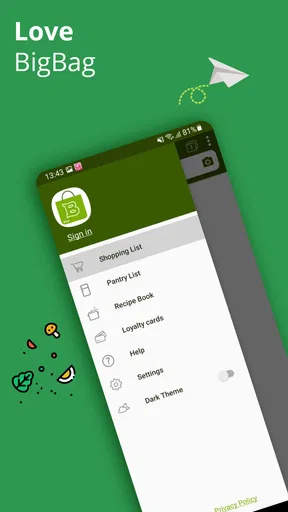
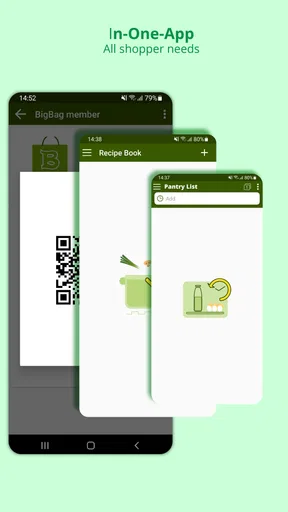
I like shopping apps that reduce the number of small decisions I have to make in a supermarket. Shopping List: BigBag Pro takes that idea further than a basic checklist by bringing shopping lists, pantry tracking, recipes, and loyalty cards into one place. After spending time with it, I see it as a practical organizer for people who want their grocery routine gathered together rather than scattered across notes, screenshots, and a wallet full of cards.
The important thing is to understand what kind of app this is. It is not trying to be a social shopping network or a delivery marketplace. It is a personal shopping companion from Smart shopping lists, designed around preparation and repeat use. That makes its value easier to judge: the more often you plan meals, maintain household supplies, or use loyalty cards, the more useful the all-in-one approach becomes.
How the app feels during everyday shopping
My first impression is that the app makes more sense when it is treated as a household system rather than a disposable list. A quick note with three items can be handled by almost any notes app. BigBag Pro becomes more interesting when I use one list for the next supermarket visit, a pantry view to remember what is already at home, recipes to guide the list, and loyalty cards that I would otherwise search for at the checkout.
That broader workflow also affects speed expectations. A shopping list app should feel ready when I need it, especially when I am standing in an aisle with one hand holding a basket. The useful performance question is not whether it looks busy, but whether I can get from opening the app to the relevant list without unnecessary hesitation. In my experience, the focused purpose helps here: I am not navigating a large entertainment app before reaching groceries.
At the same time, an all-in-one design naturally asks more of the user than a plain checklist. There are more areas to understand, and the initial setup can feel less immediate if I only want to jot down milk and bread. I would not install it expecting the absolute minimum number of taps. I would install it because those extra sections can replace several separate habits over time.
Building a list without creating extra work
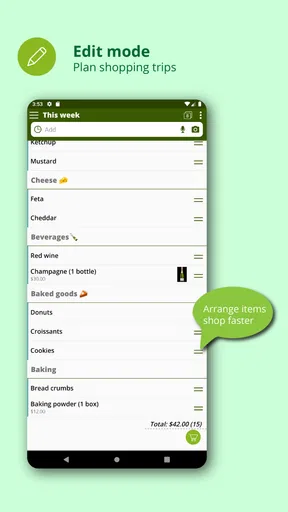
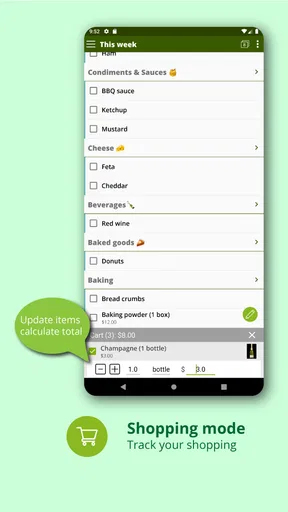
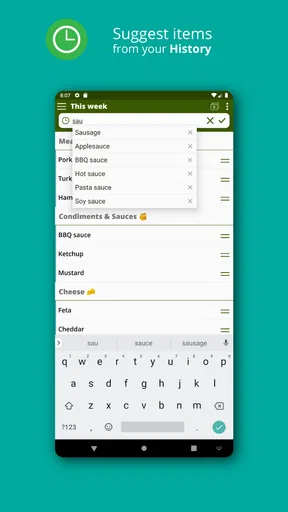
The best way to start is to create a list around a real trip instead of trying to organize the entire household on the first day. I would add the items I regularly buy, then gradually use the pantry and recipe sections when they solve a problem I actually have. This keeps the app from becoming another project that requires maintenance before it becomes useful.
One practical habit is to update the list as soon as I notice something is running low, not while I am already putting on my shoes to leave. That small change makes the app more reliable as a memory aid. The pantry section is particularly useful for avoiding the familiar mistake of buying a second item because I cannot remember whether one is hidden behind other supplies at home.
I also found that grouping my thinking by meal or household task works better than entering a random stream of products. For example, I can consider breakfast items, ingredients for a planned dinner, cleaning supplies, and personal-care products separately before combining them into the trip. This reduces the chance that an ingredient is forgotten simply because it was not part of the first mental list.
Where the recipe and pantry combination helps
The recipe book is more valuable when I use it as a bridge to shopping rather than as a place to collect recipes passively. If I decide what I want to cook before opening the supermarket list, the ingredients give me a clearer starting point. The pantry then adds an important second question: which ingredients are already available?
That workflow can save money and reduce duplicate purchases, but it depends on honest upkeep. A pantry list that has not been updated after several meals will eventually become misleading. This is one of the app’s main trade-offs: it can improve planning, but it cannot automatically know what was used unless I keep the information current.
A useful routine is to review the pantry while putting groceries away. I can mark newly purchased staples as available, remove items that have been used up, and then look at recipes later in the week. This is less glamorous than browsing recipes at random, but it creates a dependable connection between what I buy and what I can cook.
Loyalty cards are convenient, with one condition
Keeping loyalty cards in the same app is convenient for anyone who regularly forgets a physical card or dislikes switching between wallet apps and shopping tools. The advantage is not a dramatic new shopping method; it is the reduction of small interruptions at checkout. I can prepare for the trip with the list and reach for the relevant card from the same general place.
My advice is to treat this section as a convenience layer, not as the sole backup for a card that is difficult to replace. Before relying on it for an important purchase, I would make sure the card information is set up correctly and that I know how to reach it quickly. A digital organizer is most useful when it removes friction, so anything that requires last-minute searching defeats the purpose.
Performance during heavier use
BigBag Pro is likely to feel most demanding when I use several parts of it in one session: checking the pantry, opening a recipe, adding ingredients to a shopping list, and then switching to a loyalty card at the store. That is the realistic heavy-use scenario for this app. It is not about graphics or complex media; it is about moving between related records without losing track of the shopping task.
For that reason, I judge stability more by recovery from interruptions than by visual polish. Grocery shopping often involves locking the screen, putting the phone away, answering a message, or moving through areas with inconsistent attention. An app that helps me return to the correct list is more valuable than one that simply looks neat during a calm setup session.
I would also avoid building a single enormous list for every possible future purchase. Separate lists for different stores, occasions, or household members are easier to review. This is a useful performance habit as well as an organizational one: smaller, purposeful lists reduce scrolling and make it easier to see what still needs attention.
When the app is used heavily over a long period, the main resource cost is likely to come from the amount of information I choose to maintain rather than from the shopping task itself. Recipes, pantry entries, and cards can accumulate. I prefer a light cleanup every so often: remove obsolete lists, correct duplicate pantry items, and keep only the recipes I genuinely use. That keeps the experience focused and makes returning to the app faster in practice.
What happens when the shopping trip is interrupted
A realistic example is a family shopping trip where I begin with a planned dinner, notice that several pantry staples are low, and then receive a call halfway through the store. When I return, I need the current list to remain understandable rather than reconstructing the whole plan from memory. I would use separate sections or clearly named lists before leaving, because good preparation makes recovery easier than trying to repair confusion in the aisle.
The same principle applies if another person in the household adds requests. I would rather receive a clearly named item than a vague reminder such as “get snacks.” The app can organize information, but the quality of the result still depends on how specifically the household enters it. Naming the product, preferred size, or intended meal makes the list more useful under pressure.
This is also where BigBag Pro differs from a simple paper note. A paper list can be wonderfully fast for a single trip, but it does not naturally connect the trip with a pantry record, recipe planning, or stored loyalty cards. The app takes more preparation, yet it offers more context when the shopping routine is repeated.
Stability and recovery in normal use
The app’s rating is a strong sign that many users find the overall experience dependable, with an average of 4.8 from around 266 ratings. I would still avoid translating that number into a guarantee for every phone or every household workflow. Ratings describe broad user satisfaction; they do not remove the need to test how the app fits a particular routine.
My practical recovery advice is simple: keep list names clear, finish edits before entering a busy store, and avoid relying on memory for changes that have not been recorded. If I am planning a large shop, I would review the list once before leaving home. That gives me a chance to notice missing ingredients or stale pantry entries while I still have time to correct them.
The app has been available since October 23, 2018, and its current version is 12.4. That history makes it feel like an established product rather than a brand-new experiment. It also means I would expect users to approach it as a maintained tool for an ongoing routine, not merely something to install for one weekend and forget.
Device limits and who should use it
The minimum operating system is Android 5.0, so the compatibility requirement is relatively modest for Android users with older devices. That is helpful if a household keeps an older phone for shopping or uses a secondary device. Still, compatibility does not automatically mean the experience will be identical across every screen size or system configuration. Anyone with an unusual or very old handset should begin with a small list and see how comfortably the interface works before moving all their records over.
I would also consider the phone itself. A device with limited free storage, an aging battery, or many background tasks can make any app feel less responsive. Because this tool is meant to be consulted during errands, I would keep the phone charged and remove unnecessary clutter from the shopping workflow. The app cannot compensate for a device that is already struggling with basic operation.
Resource demands matter differently here than they do in a game or video app. BigBag Pro is a practical organizer, so I would not choose it for visual intensity or expect heavy multimedia use. Its usefulness comes from structured information. That generally makes it a more sensible fit for a modest phone than an app built around constant animation, but I would still keep the stored content tidy if I plan to use every section extensively.
The Everyone content rating also makes it suitable for a broad household audience. I can imagine parents, students sharing a flat, older relatives, and anyone managing recurring grocery trips finding the concept approachable. The real question is not age; it is willingness to maintain lists instead of treating the app as a one-time note.
Who will get the most from it
I would recommend it to someone who shops regularly and wants one place for more than product names. It is especially appealing if I already use a recipe collection, forget pantry supplies, or carry several loyalty cards. The combination can replace a patchwork of phone notes, paper reminders, and wallet cards with a single shopping-focused routine.
It also makes sense for a person who likes planning meals before shopping. The recipe and pantry relationship can help answer the practical question behind many grocery trips: what do I want to cook, and what do I actually need to buy? That is more useful than simply collecting recipes without connecting them to household stock.
On the other hand, I would skip it if my shopping needs are almost always one or two items and I do not want to maintain pantry information. A standard notes app may be quicker for that use. I would also look elsewhere if I need a delivery service, live supermarket pricing, collaborative family synchronization, or advanced budget analysis. Those are different priorities from the focused organizer BigBag Pro presents itself as.
Is the paid price justified?
The app costs $4.99, so I would judge it against the time and clutter it can remove rather than against a free checklist alone. If I use only the basic list, the price may feel harder to justify because free note-taking tools can cover that narrow task. If I genuinely use the pantry, recipe book, and loyalty-card sections, the all-in-one arrangement becomes easier to defend.
I would make the decision based on repetition. Someone who shops weekly and regularly cooks from planned recipes has many opportunities to benefit. Someone who buys food spontaneously and rarely checks what is at home may not use enough of the app to make the purchase worthwhile. The value grows through routine, not through a single impressive session.
There is also a personal tolerance factor. Some people enjoy maintaining an organized household record; others find it annoying and abandon it after a few days. BigBag Pro is better for the first group. Its design promises convenience through preparation, which means the user has to contribute enough information for that preparation to work.
My final view after using the full workflow
Shopping List: BigBag Pro is a focused shopping app with a broader purpose than its name initially suggests. I like that it connects the moment of planning with the moment of buying: recipes can inform the list, the pantry can prevent unnecessary purchases, and loyalty cards can stay close to the shopping task. That combination is its clearest reason to exist.
Its strongest practical advantage is not raw speed; it is reduced switching. Instead of jumping between a notes app, a recipe folder, a pantry memory, and a wallet, I can build a shopping routine around one tool. The trade-off is that I need to keep the information accurate. If I ignore the pantry or leave old lists untouched, the extra structure becomes clutter rather than help.
For performance, I see it as a sensible everyday utility rather than a demanding app. The current version is 12.4, the Android requirement reaches back to version 5.0, and its established release history gives me confidence that it is intended for continued use. I would still prepare carefully for large trips and keep lists concise so that interruptions do not turn the shop into a search exercise.
Smart shopping lists has made a paid product for people who want an organized grocery system, and I think that is the right audience to keep in mind. The app is rated for Everyone, has passed ten thousand installs, and has received over thirty written reviews, giving it a visible user base without making it feel like an anonymous mass-market tool. Those figures matter less than whether the workflow matches your habits, but they do make the app easier to consider seriously.
My recommendation is straightforward: choose it if you want your shopping list, pantry planning, recipes, and loyalty cards to work together. Skip it if you only need a temporary checklist or expect a full supermarket shopping service. For a household willing to maintain a little information, this is a useful way to make ordinary grocery trips more deliberate, less repetitive, and easier to recover when the day does not go exactly as planned.
Verdict
Strengths of Shopping List: BigBag Pro
- Quickly add items and organize them by shopping category.
- Reusable lists make routine grocery trips easier to plan.
- Simple interface is suitable for everyday household shopping.
- Helps reduce forgotten items with a clear checklist format.
- Useful for coordinating purchases across multiple shopping trips.
Limitations of Shopping List: BigBag Pro
- Advanced features may take time to discover without clear guidance.
- Large lists can become harder to manage without regular cleanup.
- Shared-list usefulness depends on reliable syncing between devices.
- The app may feel excessive for users needing only a basic checklist.
- Some users may prefer more detailed product, price, or budget tools.
Similar Picks in This Category
View All
SHEIN-Shopping Online
Roadget Business PTE. LTD.4.8

Amazon Shopping
Amazon Mobile LLC4.4


Mercado Libre: Compras online
Mercado Libre4.8

Wish: Shop and Save
Wish US Holdings LLC4.7

Alibaba.com - B2B marketplace
Alibaba Mobile4.4
Frequently Asked Questions
What is Shopping List: BigBag Pro and who is it designed for?
Shopping List: BigBag Pro is a shopping-organizer app designed to help users create, manage, and update grocery or general shopping lists from a mobile device. It can be useful for individuals, families, and anyone who wants to avoid forgetting items in a busy store. Before downloading, users should review the app’s current feature set, supported devices, and interface options to confirm that it matches their preferred shopping routine.
Does Shopping List: BigBag Pro work without an internet connection?
A shopping-list app is generally expected to remain useful while users are inside stores, where mobile coverage or Wi-Fi may be unreliable. Shopping List: BigBag Pro may allow core list-management functions to work offline, but availability can depend on the specific version and device. Check the store listing and app permissions before installing, especially if offline access, synchronization, or cloud-based features are important to you.
Can I organize items into categories or manage more than one shopping list?
Users who shop for different purposes may want separate lists for groceries, household supplies, travel, or special events. Shopping List: BigBag Pro should be evaluated for the way it handles categories, repeated products, quantities, notes, and multiple lists. These tools can make shopping faster, but the exact organization features may vary by platform or update, so confirm the current description before downloading.
Is Shopping List: BigBag Pro free to download, and does it include purchases or advertising?
The download price and business model can differ between Android and iOS, and an app labeled Pro may include paid features, a one-time purchase, subscriptions, or fewer advertisements than a free edition. Before installing Shopping List: BigBag Pro, read the relevant store page carefully for pricing, in-app purchases, trial terms, and advertising information. This helps avoid unexpected charges after installation.
What privacy information and permissions should I consider before installing it?
Shopping List: BigBag Pro may request permissions related to notifications, storage, account access, synchronization, or other device functions, depending on the version and operating system. A basic shopping list normally requires limited access, so users should review the permission prompts and the developer’s privacy policy. Avoid granting permissions that seem unrelated to the app’s shopping-list features, and check how personal data is collected or shared.
